
1. ***** "I like using the Fitbit app to view all my fitness data like steps and weight, but I track my steps with my iPhone and Apple Watch.
2. ▶ Syncing your Apple Health app everyday with myFitnessSync - Health to Fitbit for iPhone allows you to use the Fitbit app and Fitbit.com dashboard to view your fitness data.
3. myFitnessSync - Apple Health to Fitbit uploads your Apple Health data from the Apple Health app and stores it in your Fitbit account.
4. * Unfortunately, Fitbit doesn't allow third-party apps or devices to compete in step challenges or share steps with community members (friends).
5. My steps sync automatically from my Apple Watch to my Fitbit app every day like clockwork.
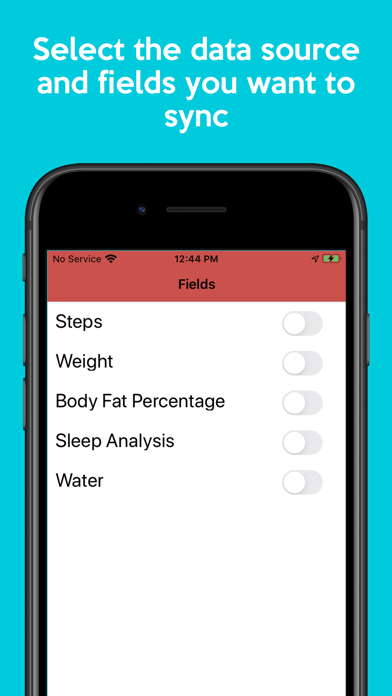
6. Pick the fitness fields (Steps, Weight, Bodyfat) you want to sync with your Fitbit account.
7. * Fitbit will not merge existing steps in your account with steps from our app.
8. This product is not put out by Fitbit, and Fitbit doesn't not service or warrant the functionality of this product.
9. ***** "I work for a large company that partners with WebMD and other resources to help encourage us to stay healthy.
10. We want to hear from you! We can't help through reviews - if you encounter any issues or would like to request a new feature please email [email protected] or click the "App Support" button in the App Store.
11. * Auto-sync may take a few days to work, as iOS controls this process based on user behavior.
12. Fitbit Sync From Apple Health 은 무료 Health & Fitness 앱으로 Bickster LLC 에서 개발했습니다. 1 개월 전 출시되었으며 4+ 연령에만 적합하며 파일 크기는 34.82 MB.
13. 현재 버전은 v2.6.0 이며 5 사람들 이상의 3.8/5 점을 받았습니다.
PC에서 Fitbit Sync From Apple Health 용 호환 APK 다운로드
| 다운로드 | 개발자 | 평점 | 점수 | 현재 버전 | 성인 랭킹 |
|---|---|---|---|---|---|
| ↓ PC용 APK 다운로드 | Bickster LLC | 5 | 3.8 | 2.6.0 | 4+ |
호환되는 PC 앱 또는 대안 확인
| 소프트웨어 | 다운로드 | 평점 | 개발자 |
|---|---|---|---|
| Fitbit Sync From Apple Health |
PC 앱 받기 | 3.8/5 5 리뷰 3.8 |
Bickster LLC |
아래 에뮬레이터 중 하나를 다운로드하십시오.
옵션 "B"는 인기에 따라 권장됩니다. 문제가 발생하면 Google 또는 Naver.com에서 좋은 해결책을 찾을 수 있습니다.보너스 : Android 및 iOS 용 다운로드
Apple Macintosh에서 Fitbit Sync From Apple Health 다운로드
| 다운로드 | 개발자 | 점수 | 현재 버전 | 성인 랭킹 |
|---|---|---|---|---|
| 무료 - Mac 에서 다운로드 | Bickster LLC | 3.8 |
2.6.0 | 4+ |
 App