



건강보험25시 는 무엇입니까? The건강보험 app is designed to provide convenient and easy access to various health-related services for the citizens of Korea. Here is an overview of the app: 1. 민원여기요 (Minwon Yeogiyo) - Allows users to submit various certificates such as qualification confirmation and insurance payment confirmation to relevant institutions via fax. - Provides services such as insurance payment and refund inquiry, medical treatment history, etc. 2. 건강iN (Health iN) - Allows users to access health check-up, medical treatment, and medication history for themselves and their family members (including infants). - Predicts health age and disease risk based on health check-up results. - Provides a national health alert service for major diseases (8 types) to help users identify the risk level in their area. - Allows users to record blood pressure, blood sugar, and other health-related data for continuous health management. 3. 장기요양보험 (Long-term Care Insurance) - Provides various long-term care services such as application for long-term care recognition, grade determination results, and home care payment service usage history. 4. 고객센터 (Customer Center) - Provides various customer support services such as consultation registration, chat counseling, and sign language counseling for the hearing and speech impaired. - Operates a citizen proposal and debate forum to create a people-centered public institution. - Allows users to report and suggest ways to improve the efficient budget operation of national health insurance and report healthcare institutions that have made unfair claims. 5. 기타 (Other) - Provides various login methods such as public, financial, private, and health insurance certification. - Allows users to set up a health alert widget that shows the risk level of major diseases in their area. - Provides a quick action function that takes users directly to the certificate issuance screen. App Permissions: [Optional] Users can still use The건강보험 app even if they do not agree to the app permissions. However, some services may be restricted. - Storage: Used to store certificates and check for OS tampering for security purposes. - Location: Used to search for nearby medical institutions and branches. - Microphone: Used for sign language counseling and voice search. - Camera: Used for sign language counseling. - Bluetooth: Used to register blood pressure, blood sugar, and step data. - Biometric authentication: Used for easy login. - Motion recognition: Used to measure step data. For more information, visit the official website, Facebook, Instagram, or Naver blog of The건강보험 app.
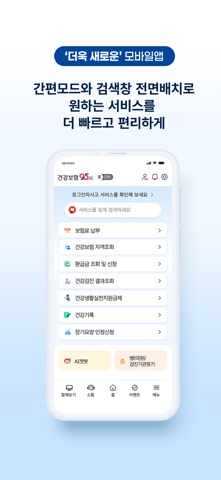
1. 통합돌봄기관, 장기요양기관, 병(의)원 등 내 주변에 위치한 각종 기관을 더욱 편리하게 찾을 수 있으며 공단의 각종 문의/불편사항을 해결할 수 있도록 상담 서비스를 제공하고 있습니다.
2. AI 기반의 건강기록 관리와 개인별 맞춤 건강서비스 추천 그리고 부모·자녀 건강정보를 공유할 수 있습니다.
3. 각종 보험료 모의계산·납부, 증명서 발급 및 민원신청 등 빠르게 건강보험공단의 서비스를 경험해보세요.
4. 더 빠르고 편리하게 접근할 수 있습니다.
5. 쉽고 간편하게 로그인하여 건강보험25시를 이용해보세요.
6. 건강보험25시 은 무료 Medical 앱으로 국민건강보험공단(National Health Insurance Corporation) 에서 개발했습니다. 3 개월 전 출시되었으며 4+ 연령에만 적합하며 파일 크기는 38.33 MB.
7. 현재 버전은 v8.5.2 이며 3.41k 천 사용자 이상의 2.1/5 점을 받았습니다.
- UI가 사용자 편리하게 처리되어 있어서 해당 부분을 찾기가 쉬움
- 보험료 납부, 임신출산진료비 잔액조회, 건강관리부터 제도안내까지 앱으로 한번에 처리 가능
- 전화상담을 위한 상담사 연결 버튼 제공
- 공인인증서 기능이 연결조차 하지 않는 것으로 보임
- 생체인식 기능이 버튼만 있어서 기능이 미흡한 것으로 보임
- 알림창이 띄워지지 않아서 사용자가 기다리게 되는 경우가 있음
- 일부 사용자들은 실행되는 탭이 하나도 없다는 등의 불만이 있음
PC에서 건강보험25시 용 호환 APK 다운로드
| 다운로드 | 개발자 | 평점 | 점수 | 현재 버전 | 성인 랭킹 |
|---|---|---|---|---|---|
| ↓ PC용 APK 다운로드 | 국민건강보험공단(National Health Insurance Corporation) | 3491 | 2.08822 | 8.5.2 | 4+ |
호환되는 PC 앱 또는 대안 확인
| 소프트웨어 | 다운로드 | 평점 | 개발자 |
|---|---|---|---|
| 건강보험25시 |
PC 앱 받기 | 2.08822/5 3491 리뷰 2.08822 |
국민건강보험공단(National Health Insurance Corporation) |
아래 에뮬레이터 중 하나를 다운로드하십시오.
옵션 "B"는 인기에 따라 권장됩니다. 문제가 발생하면 Google 또는 Naver.com에서 좋은 해결책을 찾을 수 있습니다.보너스 : Android 및 iOS 용 다운로드
Apple Macintosh에서 건강보험25시 다운로드
| 다운로드 | 개발자 | 점수 | 현재 버전 | 성인 랭킹 |
|---|---|---|---|---|
| 무료 - Mac 에서 다운로드 | 국민건강보험공단(National Health Insurance Corporation) | 2.08822 |
8.5.2 | 4+ |
앱 기능의 특징:
- 민원서비스 제출 및 조회, 건강검진 및 건강정보 확인, 장기요양 민원서비스 이용 등 다양한 건강보험 관련 서비스를 제공합니다.
- 고객센터에서 상담 글 등록, 채팅상담, 수어 상담 서비스를 이용할 수 있으며, 국민제안, 국민토론방을 운영합니다.
- 다양한 로그인 방식과 건강알람정보 위젯, 제증명서 발급화면으로 바로 이동하는 퀵액션 기능 등을 제공합니다.
- 앱 접근 권한으로 저장공간, 위치, 마이크, 카메라, 블루투스, 생체인식, 모션인식 등을 요구합니다.
 App
App