

1. Payment will be charged to the credit card connected to your Apple Account when you confirm the initial subscription purchase.
2. Note Bounce offers the following auto-renewing subscriptions to provide you with unlimited video render while you maintain an active subscription.
3. Subscriptions automatically renew unless auto-renew is turned off at least 24-hours before the end of the current subscription period.
4. Any unused portion of a free trial period, if offered, will be forfeited when you purchase a subscription, where applicable.
5. You may manage your subscription and auto-renewal may be turned off by going to your Account Settings after the purchase.
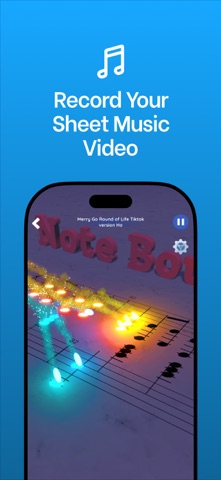
6. In Note Bounce, you'll tap bouncing balls on sheet music to play relaxing songs while learning to recognize musical notes and rhythm.
7. Your account will be charged for renewal within 24-hours prior to the end of the current period, and the cost of the renewal will be identified.
8. Explore a new way to interact with music, improve your skills, and share your best performances with the world.
9. * Features require subscription.
10. Refer to "In-App Purchases" section on App Store for the localized prices.
11. If you have any questions or suggestions on how we can improve the application, please do not hesitate to contact us.
12. Note Bounce – Sheet Music Game 은 무료 Games 앱으로 Cihad Turhan 에서 개발했습니다. 1 개월 전 출시되었으며 4+ 연령에만 적합하며 파일 크기는 412.11 MB.
13. 현재 버전은 v1.6.9 이며 4 사람들 이상의 4.5/5 점을 받았습니다.
PC에서 Note Bounce – Sheet Music Game 용 호환 APK 다운로드
| 다운로드 | 개발자 | 평점 | 점수 | 현재 버전 | 성인 랭킹 |
|---|---|---|---|---|---|
| ↓ PC용 APK 다운로드 | Cihad Turhan | 4 | 4.5 | 1.6.9 | 4+ |
아래 에뮬레이터 중 하나를 다운로드하십시오.
옵션 "B"는 인기에 따라 권장됩니다. 문제가 발생하면 Google 또는 Naver.com에서 좋은 해결책을 찾을 수 있습니다.보너스 : Android 및 iOS 용 다운로드
Apple Macintosh에서 Note Bounce 다운로드
| 다운로드 | 개발자 | 점수 | 현재 버전 | 성인 랭킹 |
|---|---|---|---|---|
| 무료 - Mac 에서 다운로드 | Cihad Turhan | 4.5 |
1.6.9 | 4+ |
 App