

1. Scan documents, convert images, and manage your files anytime with this fast and easy mobile scanner.
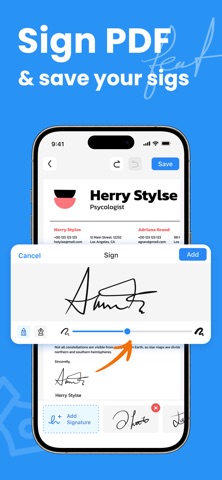
2. With a built-in img to pdf converter, powerful editing tools, and easy pdf sign, this all-in-one pdf converter app helps you scan, convert, edit, and sign documents wherever you are.
3. Instantly scan receipts, invoices, bills, IDs, business documents, agreements, letters, order sheets, and contracts and convert them into clear, high-quality PDF files.
4. From students to office workers, from IDs to notes, anyone can quickly scan documents, perform a quick scan to pdf, and organize digital files with ease.
5. Use your camera to scan documents and convert images into professional PDFs in seconds.
6. Scanner App turns your iPhone into a powerful mobile PDF document scanner for scanning documents anytime, anywhere.
7. Convert photos, screenshots, and gallery images with the built-in img to pdf tool to create professional PDF documents.
8. Scanner App combines a fast pdf scanner, img to pdf converter, pdf document scanner, and easy pdf sign tool into one simple pdf converter app.
9. Capture receipts, invoices, IDs, notes, and contracts and convert them into high-quality PDF or JPEG files.
10. Annotate PDFs by highlighting text, adding notes, and marking key points to organize documents more efficiently.
11. Use your camera to scan documents instantly.
12. Scanner App: Scan Documents 은 무료 Business 앱으로 UNITEMAN TECHNOLOGY (HK) LIMITED 에서 개발했습니다. 3 개월 전 출시되었으며 4+ 연령에만 적합하며 파일 크기는 108.32 MB.
13. 현재 버전은 v11.7 이며 38 사람들 이상의 4.6/5 점을 받았습니다.
PC에서 Scanner App: Scan Documents 용 호환 APK 다운로드
| 다운로드 | 개발자 | 평점 | 점수 | 현재 버전 | 성인 랭킹 |
|---|---|---|---|---|---|
| ↓ PC용 APK 다운로드 | UNITEMAN TECHNOLOGY (HK) LIMITED | 38 | 4.63157 | 11.7 | 4+ |
호환되는 PC 앱 또는 대안 확인
| 소프트웨어 | 다운로드 | 평점 | 개발자 |
|---|---|---|---|
| Scanner App |
PC 앱 받기 | 4.63157/5 38 리뷰 4.63157 |
UNITEMAN TECHNOLOGY (HK) LIMITED |
아래 에뮬레이터 중 하나를 다운로드하십시오.
옵션 "B"는 인기에 따라 권장됩니다. 문제가 발생하면 Google 또는 Naver.com에서 좋은 해결책을 찾을 수 있습니다.보너스 : Android 및 iOS 용 다운로드
Apple Macintosh에서 Scanner App 다운로드
| 다운로드 | 개발자 | 점수 | 현재 버전 | 성인 랭킹 |
|---|---|---|---|---|
| 무료 - Mac 에서 다운로드 | UNITEMAN TECHNOLOGY (HK) LIMITED | 4.63157 |
11.7 | 4+ |
 App