

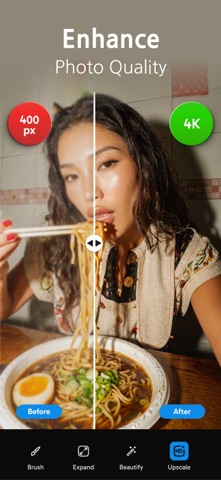

1. Edit photos with easy retouch, create endless creative collages with AI pic collage maker, whiten your teeth, smooth your skin, or change your hairstyle with a beauty editor and fun hairapp! While many classic AI photo generator apps focus on creating entirely new images or stylized avatars, Layers is designed for edit-driven transformations: elevate what you already captured with easy retouch, keep your identity and details intact, and get a clean, natural-looking finish that fits social, professional, and everyday use.
2. Turn quick selfies into confident, camera-ready shots with amazing blemish remover, ptoro retouch makeup app! Try makeup filters, add freckles to your face to look cuter with photo retouch, remove eye bags, glow your skin with skin smoothing photo editor.
3. From holiday seasons and New Year energy to Christmas warmth, Halloween mood, Valentine’s Day romance, and bright summer looks, Layers - AI Photo Editor helps your photos feel current without needing complicated templates or design skills.
4. Layers - AI Photo Editor, product background remover and product photography app helps creators and sellers make ultra professional product photo that look like they were shot in a studio.
5. Generate sharp, professional ai headshots that look clean and confident, craft portraits with a timeless “old money” aesthetic with ai portrait generator, or go bold with fashion editorial portrait vibes with ai photo generator your social media accounts.
6. Try different hairstyles like red hair filter or blonde hair filter, change hairstyle with hair color changer and hair styler app and refine the overall look with freckles, brow adjustments with easy retouch and gentle clean-ups! Ideal for everyday posts, profile photos, and glow-ups that still look like you.
7. Instantly create a clean white background for marketplace listings with product background remover and product photography app, generate UGC-style unboxing visuals that feel authentic and on-trend, and add a realistic soft shadow under your product to ground it naturally.
8. Layers: AI Photo Editor is an extraordinary AI photo editing and photo retouch app built for people who want results that look polished, realistic, and ready to post, without spending hours tweaking sliders.
9. Layers - AI Photo Editor is made for creators, professionals, small businesses, and anyone who wants better photos fast.
10. Tell your story with collages that feel curated, not cluttered with this incredible pic collage maker! Build photodump layouts that look intentional, stack memories with a clean 3-layers composition, or go nostalgic with Polaroid frames and film strip styles.
11. Whether it’s a weekend recap, travel highlights, or a moodboard post, Layers makes it easy to create shareable collages that match your aesthetic.
12. AI 사진 편집기、사진 향상기 - Layers 은 무료 Graphics & Design 앱으로 HITDEV AI Teknoloji Anonim Şirketi 에서 개발했습니다. 1 일 전 출시되었으며 12+ 연령에만 적합하며 파일 크기는 91.43 MB.
13. 현재 버전은 v1.1.0 이며 4 사람들 이상의 3.5/5 점을 받았습니다.
PC에서 AI 사진 편집기、사진 향상기 - Layers 용 호환 APK 다운로드
| 다운로드 | 개발자 | 평점 | 점수 | 현재 버전 | 성인 랭킹 |
|---|---|---|---|---|---|
| ↓ PC용 APK 다운로드 | HITDEV AI Teknoloji Anonim Şirketi | 4 | 3.5 | 1.1.0 | 12+ |
호환되는 PC 앱 또는 대안 확인
| 소프트웨어 | 다운로드 | 평점 | 개발자 |
|---|---|---|---|
| AI 사진 편집기、사진 향상기 |
PC 앱 받기 | 3.5/5 4 리뷰 3.5 |
HITDEV AI Teknoloji Anonim Şirketi |
아래 에뮬레이터 중 하나를 다운로드하십시오.
옵션 "B"는 인기에 따라 권장됩니다. 문제가 발생하면 Google 또는 Naver.com에서 좋은 해결책을 찾을 수 있습니다.보너스 : Android 및 iOS 용 다운로드
Apple Macintosh에서 AI 사진 편집기、사진 향상기 다운로드
| 다운로드 | 개발자 | 점수 | 현재 버전 | 성인 랭킹 |
|---|---|---|---|---|
| 무료 - Mac 에서 다운로드 | HITDEV AI Teknoloji Anonim Şirketi | 3.5 |
1.1.0 | 12+ |
 App
App