1. It brings your song settings, set order, song forms, and performance cues together, so you can stay focused from individual practice to rehearsals and live shows.
2. Paste song titles and YouTube links to build a Daylist quickly, then keep your library in sync across iPhone and iPad with iCloud.
3. Save BPM, time signature, rhythm, click sound, and a YouTube link for each song.
4. Add cues including Build-up, Breakdown, All-in, Count, and Transpose, plus bar-level tempo and meter changes, to see what comes next while you play.
5. Back up and restore your data, import a setlist image from Sheet, or send a Click Me setlist to Sheet and continue preparing your charts.
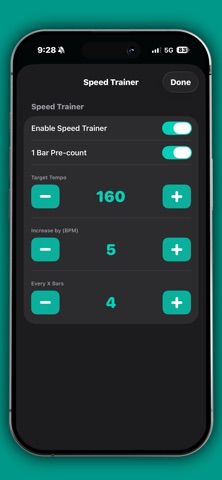
6. Speed Trainer raises the tempo automatically at intervals you choose, helping you work toward your target BPM step by step.
7. Multiple click sounds, Humanize, screen flash, and keyboard shortcuts are also supported.
8. Enter the tempo directly, use Tap Tempo, or detect BPM while playing a YouTube reference.
9. Click Me goes beyond keeping time.
10. Arrange songs in performance, rehearsal, or worship order.
11. Map sections such as Intro, Verse, Chorus, Bridge, and Outro by bar.
12. Click Me - metronome 은 무료 Music 앱으로 minseok kwak 에서 개발했습니다. 1 개월 전 출시되었으며 4+ 연령에만 적합하며 파일 크기는 8.98 MB.
13. 현재 버전은 v2.6.1 이며 16 사람들 이상의 5/5 점을 받았습니다.
PC에서 Click Me - metronome 용 호환 APK 다운로드
| 다운로드 | 개발자 | 평점 | 점수 | 현재 버전 | 성인 랭킹 |
|---|---|---|---|---|---|
| ↓ PC용 APK 다운로드 | minseok kwak | 16 | 5 | 2.6.1 | 4+ |
아래 에뮬레이터 중 하나를 다운로드하십시오.
옵션 "B"는 인기에 따라 권장됩니다. 문제가 발생하면 Google 또는 Naver.com에서 좋은 해결책을 찾을 수 있습니다.보너스 : Android 및 iOS 용 다운로드
 App