Hermex  PC 용

PC 용 Hermex

  • ⓘ 호환성: 필요 Windows 11, Windows 10, Windows 8 그리고 Windows 7
  • 카테고리: Developer Tools
  • 개발자: Uzair Ansar
  • 최근 업데이트: 2026-11-09
  • 현재 버전: 2.1
  • 파일 크기: 86.40 MB


앱 다운로드 ⇩
누적 사용자 평가:

5/5

5
2 표 기준

  ★ ★ ★ Hermex 개요


☶Hermex 에 대한 13 가지 세부 정보

1. Message previews are encrypted on your Hermes host and decrypted on your iPhone; the relay handles device tokens, notification metadata, and ciphertext, never message text, server URLs, or Hermes server credentials.

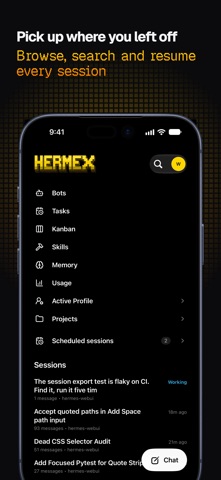
2. Hermex is a native iPhone and iPad client for your self-hosted Hermes agent.

3. Switch between Bots and Sessions, manage Kanban boards and Cards, browse Tasks, Skills, Memory, and Usage, and choose models, Profiles, and reasoning settings.

4. Move to Hermes brings a Web UI server’s chats, drafts, and notifications over to your Hermes host.

5. Existing Hermes Web UI servers keep working as legacy.

6. Open existing sessions, start conversations, and follow streamed responses, tools, and reasoning as they arrive.

7. Review file edits as diffs, browse workspace files, send photos and files, and dictate messages.

8. You need your own reachable Hermes server.

9. It connects directly to your Hermes host, including a Hermes Webapp.

10. Agent execution happens on your configured server, not on the iPhone.

11. Recent sessions and messages may be cached locally for read-only offline viewing; clear that cache from Settings.

12. Hermex 은 무료 Developer Tools 앱으로 Uzair Ansar 에서 개발했습니다. 2 주일 전 출시되었으며 4+ 연령에만 적합하며 파일 크기는 86.40 MB.

13. 현재 버전은 v2.1 이며 2 사람들 이상의 5/5 점을 받았습니다.


PC에서 Hermex 용 호환 APK 다운로드


다운로드 개발자 평점 점수 현재 버전 성인 랭킹
↓ PC용 APK 다운로드 Uzair Ansar 2 5 2.1 4+

Windows PC에서 Hermex 다운로드 및 설치 방법.

호환되는 PC 앱 또는 대안 확인


소프트웨어 다운로드 평점 개발자
PC 소프트웨어 2 Hermex PC 앱 받기 5/5
2 리뷰
5
Uzair Ansar

또 다른 옵션은 아래 가이드에 따라 PC에서 사용하는 것입니다:

1: Windows 용 Android 소프트웨어 에뮬레이터 다운로드

아래 에뮬레이터 중 하나를 다운로드하십시오.

  1. Nox App
  2. Bluestacks App
옵션 "B"는 인기에 따라 권장됩니다. 문제가 발생하면 Google 또는 Naver.com에서 좋은 해결책을 찾을 수 있습니다.


2: 이제 Windows PC에 소프트웨어 에뮬레이터 설치

  1. 컴퓨터의 다운로드 폴더 또는 다운로드한 파일을 저장하는 곳으로 이동합니다.
  2. "Hermex"를 클릭합니다. 설치 프로세스가 시작됩니다.
  3. 사용권 계약에 동의하고 화면의 지시를 따릅니다. 소프트웨어가 설치됩니다.

3: Windows PC 용 Hermex 사용 방법 - Windows 7, 10, 11

  1. 컴퓨터에서 에뮬레이터를 열고 MSFT를 검색합니다.
  2. "Hermex" »» "설치"를 클릭하여 앱을 설치합니다.
  3. Hermex 앱을 사용하려면 에뮬레이터 »» "모든 앱"을 엽니다.

보너스 : Android 및 iOS 용 다운로드

Windows 11에서 Hermex 를 다운로드하고 설치하는 단계


  1. Hermex 에 이미 Windows 스토어에 기본 버전이 있는지 확인하십시오. 이 링크를 따라 ». 기본 버전이 없으면 다음 단계로 이동합니다.
  2. 아마존 앱스토어 설치이 링크를 따라 ». "받기"를 클릭하여 설치 프로세스를 시작하십시오.
  3. 설치 후 Amazon Appstore 및 Android용 Windows 하위 시스템 설정 앱이 시작 메뉴와 앱 목록에 나타납니다. Amazon Appstore를 열고 Amazon 계정으로 로그인합니다.
  4. Amazon 앱 스토어로 이동하여 "Hermex" 를 검색합니다.
  5. 앱 아이콘을 클릭하여 앱 페이지를 엽니다. "설치"를 클릭하십시오. 앱이 설치됩니다.

Apple Macintosh에서 Hermex 다운로드


다운로드 개발자 점수 현재 버전 성인 랭킹
무료 - Mac 에서 다운로드 Uzair Ansar
5
2.1 4+

당신이 좋아할 앱


소프트웨어 더보기 Uzair Ansar

keyboard_arrow_up