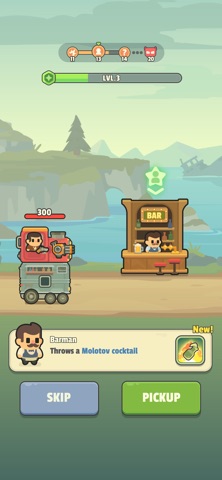


1. It’s time to live out your apocalypse dreams with My Train Defense, an idle tower defense game chock full of enemies and battles! Equip your train to travel the country and take them out, armed with the latest and greatest weapons.
2. Towers and trains – Think tower defense, but on a train! This idle game combines the best of both worlds, allowing you to practice your strategy skills while on the go.
3. ● Strategize and chill – Enjoy fighting wars with enemies as part of your tower defense, while also making the most of the bonuses and upgrades that become available the more you play.
4. Epic enemies – From standard zombies to crazy bosses, get ready to waves of wars as you practice your shooting skills on enemies galore.
5. My Train Defense offers the perfect mix of tower defense strategy and idle fun.
6. Wild weapons – Machine guns, flamethrowers, and so much more await you and your team! The further you travel, the more weapons you’ll be able to unlock and upgrade, creating quite the nasty surprise for any stray zombies.
7. Exciting events – In addition to the standard idle shooting aspect, try your hand and aim at the various mini-games, and stock up on valuable weapon upgrades and rewards.
8. In this idle survival, the goal is to ride along in your train and wipe out any enemies you come across.
9. Battle buddies – As you travel the lands, gather survivors who will, as a thank you for rescuing them, offer up their unique weapons and skills.
10. Make sure to collect a wide variety of weapons and powerups to be ready to take on whatever the world may throw at you and your train.
11. Mix and match to create different teams and see which best suits your fighting style.
12. My Train Defense 은 무료 Games 앱으로 SayGames LTD 에서 개발했습니다. 2 주일 전 출시되었으며 9+ 연령에만 적합하며 파일 크기는 343.05 MB.
13. 현재 버전은 v1.1.4 이며 4 사람들 이상의 5/5 점을 받았습니다.
PC에서 My Train Defense 용 호환 APK 다운로드
| 다운로드 | 개발자 | 평점 | 점수 | 현재 버전 | 성인 랭킹 |
|---|---|---|---|---|---|
| ↓ PC용 APK 다운로드 | SayGames LTD | 4 | 5 | 1.1.4 | 9+ |
아래 에뮬레이터 중 하나를 다운로드하십시오.
옵션 "B"는 인기에 따라 권장됩니다. 문제가 발생하면 Google 또는 Naver.com에서 좋은 해결책을 찾을 수 있습니다.보너스 : Android 및 iOS 용 다운로드
Apple Macintosh에서 My Train Defense 다운로드
| 다운로드 | 개발자 | 점수 | 현재 버전 | 성인 랭킹 |
|---|---|---|---|---|
| 무료 - Mac 에서 다운로드 | SayGames LTD | 5 |
1.1.4 | 9+ |
 App