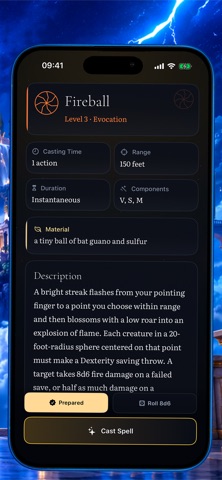
1. Browse a full spell compendium with the detail you actually check at the table: level, school, casting time, range, components with material text, duration, and ritual or concentration marks, plus class lists and higher-level scaling.
2. Prepare or learn spells within the exact limit for their level and ability, keep always-prepared entries, and run two independent pools of magic, standard casting and pact magic, each on its own ring of glyph-nodes you tap to spend or restore.
3. Author your own spells and magic items field by field, track attunement against the three-item cap, spend item charges, and keep tagged session notes with photos beside cross-linked rules and conditions.
4. Spells, prepared lists, concentration, and your magic capacity turn like an orrery of glyphs across celestial marble, a table companion that looks the part while it handles the bookkeeping.
5. Search instantly and stack filters across seven axes at once, by level, school, class, ritual, concentration, component, and damage or save.
6. Concentration is one living thing: it names the spell, counts the rounds, and when a linked combatant takes damage it works out the save and asks you to hold or drop.
7. Non-player characters use the same record, so a patron or a bandit captain drops into initiative in two taps, next to players, allies, and monsters drawn from hundreds of creature stat blocks.
8. Sigilry is a spellbook for fantasy tabletop casters, made so everything you reach for mid-session lives in one place.
9. Keep the whole table beside your casters.
10. Every caster is a real, playable record you build by hand.
11. Run the encounter with a round counter, hit-point changes, and condition tags.
12. Sigilry 은 무료 Reference 앱으로 BASYL OPAL 에서 개발했습니다. 2 개월 전 출시되었으며 4+ 연령에만 적합하며 파일 크기는 14.70 MB.
13. 현재 버전은 v1.0.0 이며 0 사용자 이상의 5/5 점을 받았습니다.
아래 에뮬레이터 중 하나를 다운로드하십시오.
옵션 "B"는 인기에 따라 권장됩니다. 문제가 발생하면 Google 또는 Naver.com에서 좋은 해결책을 찾을 수 있습니다.보너스 : Android 및 iOS 용 다운로드
 App